Packaged food guide
How to create nutrition labels for packaged food without losing your sanity
Creating nutrition labels for packaged food usually means pulling recipe data, checking ingredient matches, choosing the right market, and exporting a file you can actually trust. RecipeChef keeps those steps connected in one workflow.
Keep ingredient quantities, servings, and product details together instead of rebuilding them in separate label tools.
Use visible review states and manual overrides when something needs a closer look.
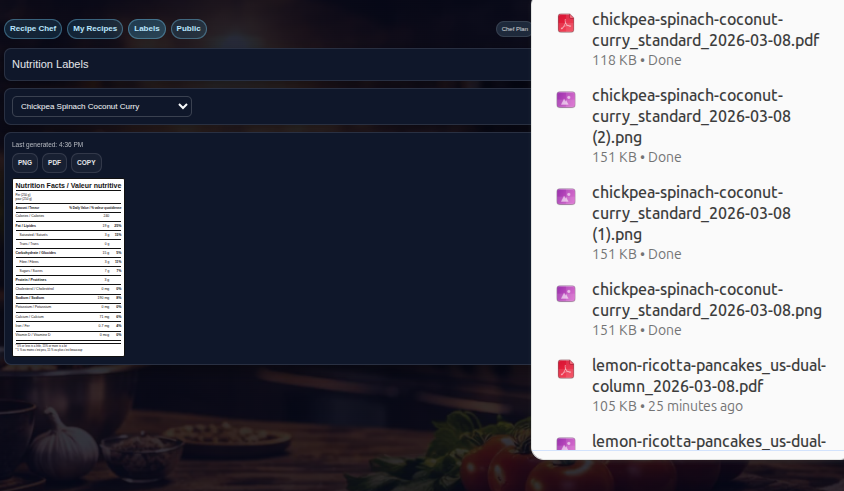
Download from the saved label version so the file stays tied to the reviewed state.
What this page covers
A practical packaged-food labeling workflow
The exact rules depend on market, but the workflow most teams need is surprisingly consistent.
- Build or import the product recipe and serving details in one place.
- Choose the market-specific workflow for Canada or the United States.
- Review matched ingredient descriptions and apply manual fixes if needed.
- Select the label layout that fits your packaging needs.
- Export PNG or PDF from the saved version you reviewed.
FAQ
Packaged food label questions
How do you create nutrition labels for packaged food?
A practical workflow is to start from the recipe, review ingredient and nutrition outputs, choose the market-specific label path, and export the approved result.
Can one tool handle costing and labels together?
Yes. RecipeChef is designed to keep recipe costing and nutrition label generation connected in one workflow.
Does RecipeChef support both Canada and the US?
Yes. RecipeChef supports market-specific workflows for Canada and the United States.
Ready to move faster?
Turn recipe data into label-ready packaged-food files.
RecipeChef keeps recipe details, review steps, and label exports together so packaged food workflows stop fragmenting into multiple tools.